Per-seat license tracking
Track individual research database seats and renewal dates, not just one expiry date for the whole subscription.
Westlaw, LexisNexis, Practical Law — legal research subscriptions have a habit of living in someone's inbox until the renewal notice lands with no warning. Librygo tracks every seat with its own expiry date, keeps the catalog as internal as you need it, and controls access by practice group.
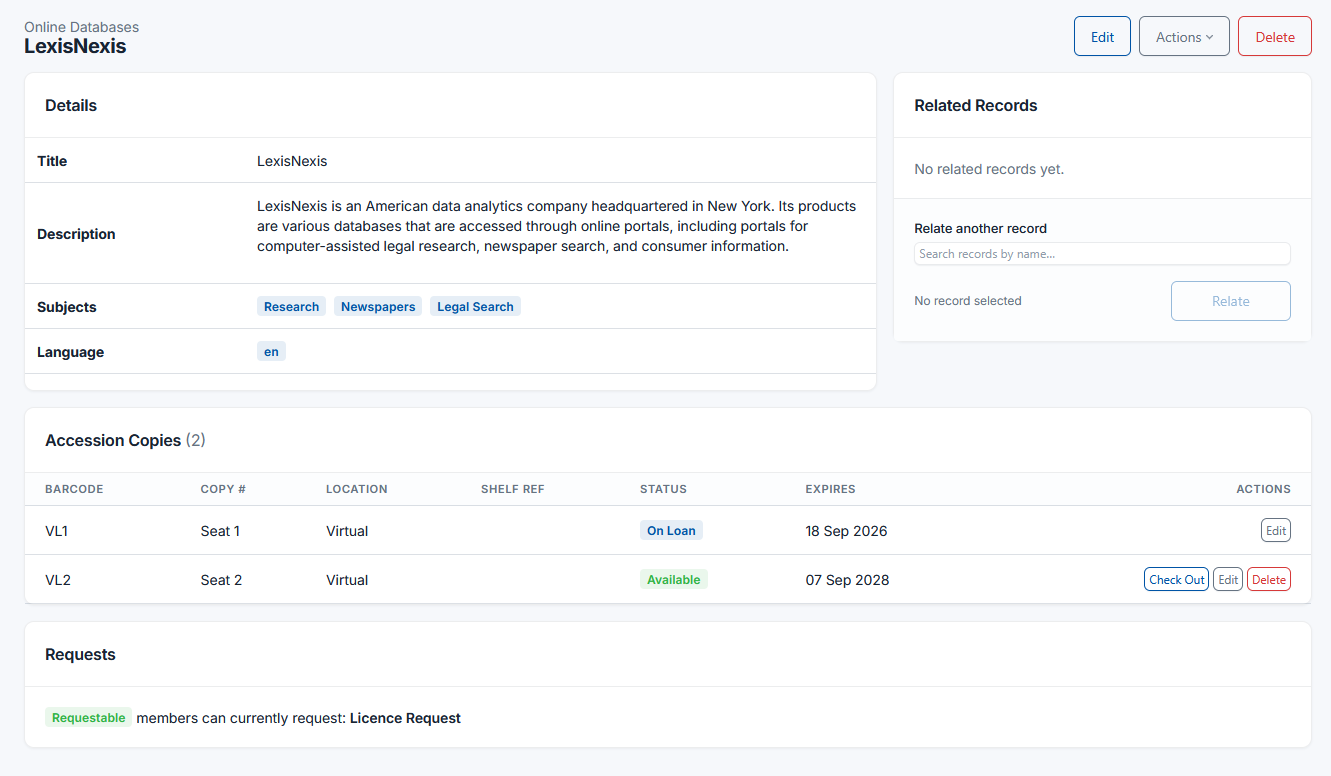
A "LexisNexis" record can hold five license seats, each nested underneath with its own renewal date. Expired seats are flagged automatically, right on the record, and two built-in reports — "Expiring" and "Expired" — catch anything due before it lapses, on a dashboard where budget holders can see it too.
Track individual research database seats and renewal dates, not just one expiry date for the whole subscription.
Restrict the search portal to the firm, or turn it off entirely — client-sensitive know-how doesn't belong on a public catalog.
Scope roles and permissions so a practice group sees the record types and fields relevant to their work, not the whole firm's collection.
Boolean quick search and a visual Advanced Search builder for finding a specific treatise, practice note, or jurisdiction quickly.
Custom fields for jurisdiction, practice area, or matter type — defined by you, not a fixed classification scheme.
Treatises and practice guides can still be checked out to fee-earners with loans, holds, and renewals, alongside the digital resources.
Read more about license tracking on our features page, or see Librygo for Special Libraries.
We'll walk through license tracking, access by practice group, and search — set up around how your firm works.